Website Accessibility Checks
This feature is new in the upcoming Quarto 1.11 release. To use the feature now, you’ll need to download and install the Quarto pre-release.
quarto call axe is experimental. The command is hidden, so it does not appear in quarto call --help, and it carries no stability promise. Flags, artifacts, and behavior can change between pre-release builds.
Tell us how it works for you in Quarto discussions.
Overview
quarto call axe scans a rendered Quarto site for accessibility violations with axe-core. It drives headless Chrome over every page of the site, at a desktop and a mobile viewport, in each color mode the page supports.
The command groups violations by root cause and compares them against a baseline that you commit. It then writes a report. You can read that report, post it into a pull request, or use it to fail a CI job.
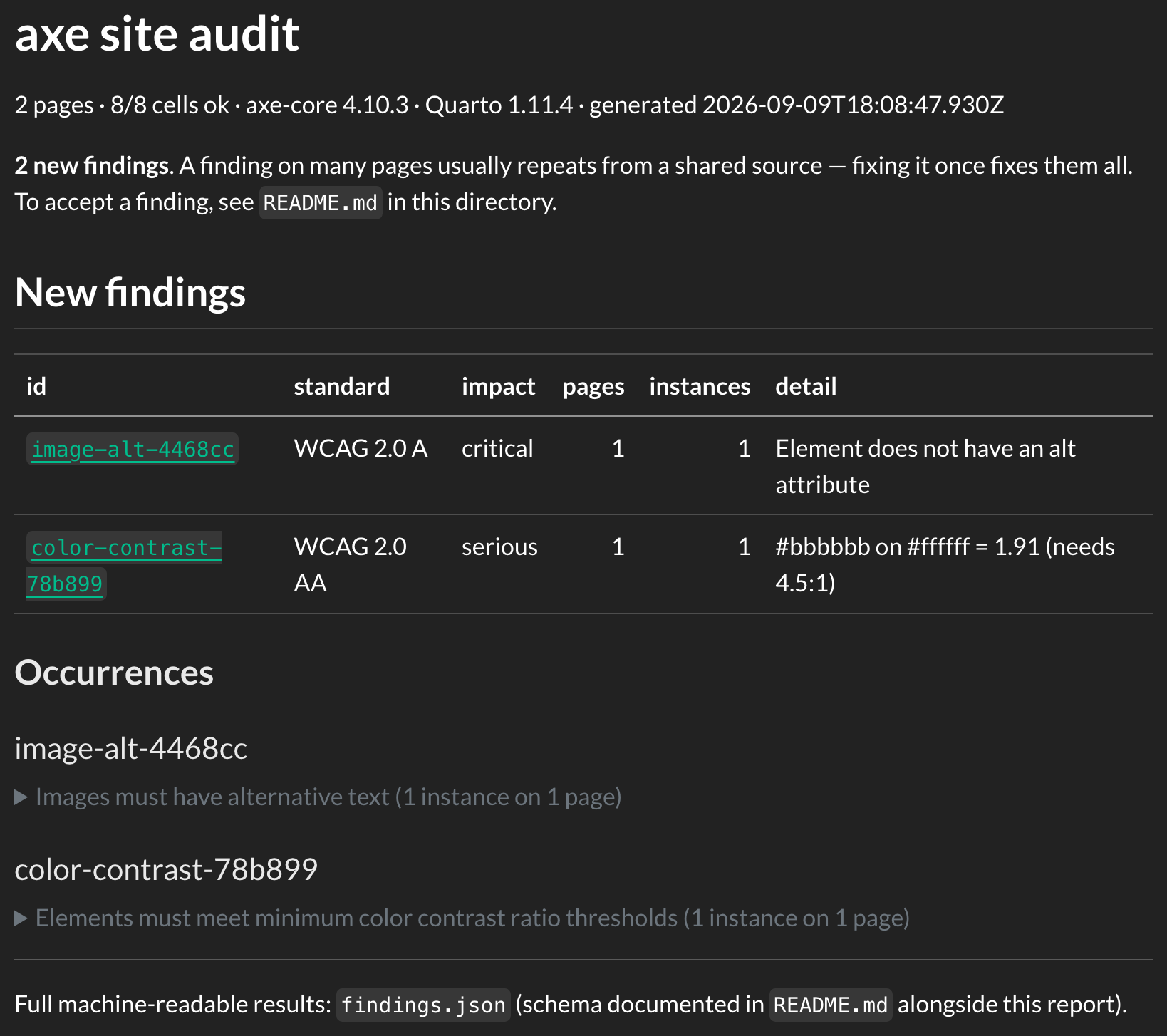
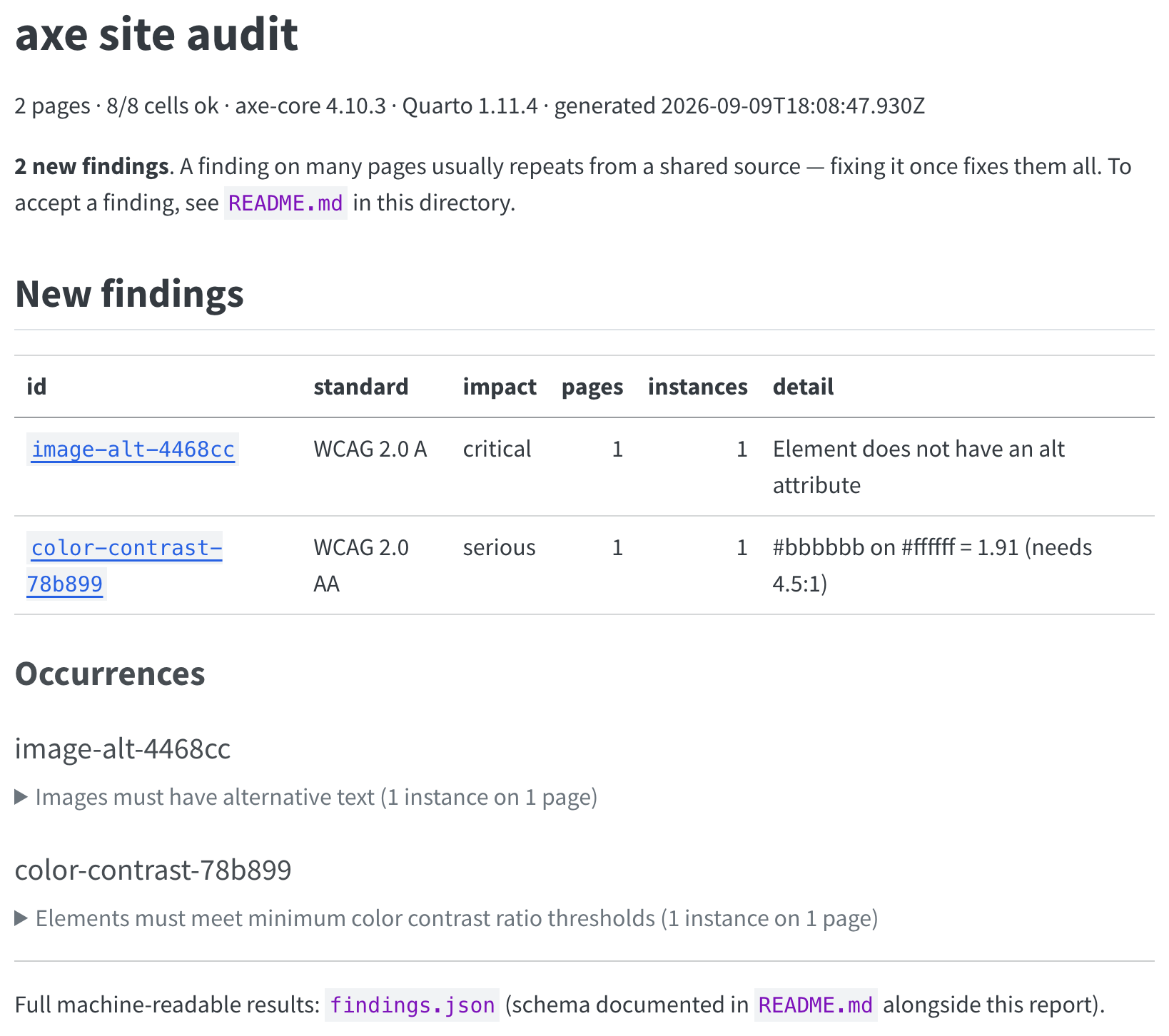
The report, rendered as a web page:
When to Use a Site Scan
Quarto gives you two ways to check accessibility, and they answer different questions.
The axe format option checks the page you are looking at, in your own browser, while you write it. Use it for fast feedback on one page.
quarto call axe checks the whole site: every page, both viewports, and light and dark mode. It runs after a render, or in CI. Use it when you want a site-wide inventory of problems, a gate that catches new ones, or output that an agent can work through.
Prerequisites
The scan needs a Chromium browser that Quarto can find. An installed system Chrome or Edge works, or you can install one with Quarto:
Terminal
quarto install chrome-headless-shellYour First Scan
Render your site, then scan the output directory:
Terminal
quarto render
quarto call axe _site
The examples on this page come from a two-page site. It has a navbar, a light theme and a dark theme, an image with no alt attribute, and one span of low-contrast text.
The scan prints the matrix it covers, then one line for each cell, then a summary of the findings:
$ quarto call axe _site
axe: 2 pages (2 light+dark) × 2 viewports — 8 cells
  gear.html 1440x900 light                                   0  (none)
  gear.html 1440x900 dark                                    0  (none)
  gear.html 320x568 light                                    0  (none)
  gear.html 320x568 dark                                     0  (none)
  index.html 1440x900 light                                  2  color-contrast,image-alt
  index.html 1440x900 dark                                   1  image-alt
  index.html 320x568 light                                   2  color-contrast,image-alt
  index.html 320x568 dark                                    1  image-alt

8 cells: 8 ok
axe-core 4.10.3 (quarto-cli's vendored build, injected at scan time)

  ID                     IMPACT    STANDARD     N  PAGES  STATUS
  image-alt-4468cc       critical  WCAG 2.0 A   1  1      new
  color-contrast-78b899  serious   WCAG 2.0 AA  1  1      new

  2 findings (2 new, 0 known)
A cell is one page, at one viewport, in one color mode. A page with a light mode and a dark mode contributes two cells for each viewport. A page with a single mode contributes one. Two pages with two modes, at two viewports, therefore give eight cells.
The matrix matters because a violation can appear in one cell and not in another. In the output above, image-alt appears in all four cells of index.html, but color-contrast appears only in the light cells. The dark theme gives that text enough contrast.
Scan Artifacts
The scan writes its artifacts to _axe-checks/ at the project root. The project root is the directory of the nearest _quarto.yml at or above the site directory.
| File | What it is |
|---|---|
findings.json |
Every finding, machine-readable. |
report.md |
The summary for people to read, in GitHub-flavored markdown. |
README.md |
Generated documentation for the artifacts, including how to write a baseline. |
cells/ |
The raw axe-core output for each cell. |
The _axe-checks/ directory ignores itself: the scanner writes a .gitignore with * into it. The directory is a disposable snapshot, and you never commit it.
Read the generated README.md after a scan. It documents the shape of every entry in findings.json, and it always matches the build that wrote it.
Each finding carries an id that is stable across runs, such as image-alt-6e3b76. The id works as a handle in a task list, or in an instruction to an agent that reads the artifacts for you.
Fixes belong in your Quarto source: a .qmd file, _quarto.yml, _brand.yml, or a theme .scss file. Do not edit the rendered site directory, because the next render overwrites it.
Reading the Report
report.md is GitHub-flavored markdown. Read it where markdown already renders: the preview in your editor, GitHub, or the sticky pull request comment from the CI recipe below. You do not need to render it.
For a standalone HTML view, render the report:
Terminal
quarto render _axe-checks/report.mdThen open _axe-checks/report.html in your browser. The output lands beside the report, inside the artifact directory that ignores itself.
The report for the scan above opens with a summary table of the new findings:
_axe-checks/report.md
# axe site audit

2 pages · 8/8 cells ok · axe-core 4.10.3 · Quarto 1.11.4 · generated 2026-09-09T18:06:32.133Z

**2 new findings**. A finding on many pages usually repeats from a shared source — fixing it once fixes them all. To accept a finding, see `README.md` in this directory.

## New findings

| id | standard | impact | pages | instances | detail |
|---|---|---|---:|---:|---|
| [`image-alt-4468cc`](#image-alt-4468cc) | WCAG 2.0 A | critical | 1 | 1 | Element does not have an alt attribute |
| [`color-contrast-78b899`](#color-contrast-78b899) | WCAG 2.0 AA | serious | 1 | 1 | #bbbbbb on #ffffff = 1.91 (needs 4.5:1) |
Each id in the table links to an occurrence block further down the report. The block names the rule and the standard, and it lists the cells that the finding appeared in:
_axe-checks/report.md
#### color-contrast-78b899

**Standard:** WCAG 2.0 AA (1.4.3) · **Impact:** serious · **Signature:** `color-contrast :: #bbbbbb on #ffffff`

**Problem:** #bbbbbb on #ffffff = 1.91 (needs 4.5:1)

Reference: <https://dequeuniversity.com/rules/axe/4.10/color-contrast?application=axeAPI>

| page | cells (width·mode) | selector | element |
|---|---|---|---|
| index.html | 1440x900·light, 320x568·light | `p:nth-child(4) > span` | `<span style="color: #bbb">tide table</span>` |
The cells column lists only the light cells, because the dark theme gives that text enough contrast. The selector and element columns are what you search for in your source.
One finding is one root cause, not one element. An image with no alt text in a shared include is one finding with a count of instances, not one finding for each page that uses the include. A finding on many pages usually comes from a shared source, such as a template, the theme, or the navigation that Quarto generates. One fix clears them all.
Scan Options
| Flag | Default | Description |
|---|---|---|
--pages <globs> |
all *.html |
Comma-separated globs, relative to the site directory. |
--exclude <globs> |
— | Globs to skip, applied after --pages. |
--max-pages <count> |
∞ | A cap on the number of pages. The pages are sorted first, so the cap is deterministic. Redirect stubs do not use up the cap. |
--viewports <viewports> |
1440x900,320x568 |
Comma-separated WxH viewports to emulate. |
--themes <themes> |
light,dark |
Which color modes to scan. This filters pages with two modes. A page with a single mode always scans once. |
--timeout <ms> |
30000 |
The time budget for one cell. |
--settle <ms> |
50 |
An extra delay after the page reports that it is ready. |
--fail-on <impact> |
off | Exit 1 when there are new findings at or above minor, moderate, serious, or critical. |
--report <path> |
_axe-checks/report.md |
Write the report somewhere else, such as inside your site source. |
The narrow default viewport is 320 CSS pixels wide. This is the width that WCAG’s reflow criterion (SC 1.4.10) names, and it is equivalent to 400% zoom on a 1280 pixel window. Every rule therefore runs against the reflowed mobile layout of your site.
If you scan a subset with --pages, --exclude, or --max-pages, the artifacts say so. Their counts describe the subset, not the site.
Accepting Findings with a Baseline
The first scan of a real site reports findings that you will not fix today. They include defects in an upstream library, best-practice items you defer, and false positives.
The baseline is the committed record of those decisions. It lives in _axe-baseline.json at the project root, beside the _axe-checks/ directory and never inside it.
Scan the site, then fix what you can from
report.md.For each finding that you accept instead, copy it out of
findings.jsoninto thefindingsarray of the baseline. Trim it, then add anotethat says why you accepted it.Commit
_axe-baseline.json.
The generated _axe-checks/README.md documents the fields of a baseline entry, and how the pages field scopes one.
Every report from then on separates new findings from baselined ones. Only new findings can fail CI. A baselined finding alerts again as new when its impact escalates, or when it appears on a page outside its scope.
Entries that a full-site scan no longer sees are reported as stale. Prune them by hand. A subset scan cannot tell a fixed finding from a page it did not scan.
Exit Codes
| Exit code | Meaning |
|---|---|
0 |
The scan is complete. There are no new findings at or above the --fail-on impact, if you gave that flag. |
1 |
The scan is complete, and there are new findings at or above the --fail-on threshold. |
2 |
The scan is incomplete. A cell timed out or errored, no browser started, or there was nothing to scan. Code 2 takes precedence over code 1, because an incomplete scan never reads as a pass. |
3 |
Usage error. The command got a flag value it cannot accept, such as --fail-on serius, or a filter that matches nothing, such as --themes dark on a site with no dark mode. A typo is not a result, so it gets its own code. |
Checking Accessibility in CI
Without --fail-on, the scan reports findings and exits 0. Add --fail-on <impact> to make new findings fail the job. A minimal gate for GitHub Actions:
.github/workflows/accessibility.yml
- uses: quarto-dev/quarto-actions/setup@v2
- run: quarto install chrome-headless-shell --no-prompt
- run: quarto render
- run: quarto call axe _site --fail-on serious
report.md is GitHub-flavored markdown, so a workflow can post it straight into the pull request. No Quarto-side tooling is needed. Use a sticky comment, which updates in place on each push instead of adding one comment for each run:
.github/workflows/accessibility.yml
- if: always()
  uses: marocchino/sticky-pull-request-comment@v2
  with:
    header: axe
    path: _axe-checks/report.md
The if: always() condition keeps the comment current when --fail-on fails the job. The header key identifies the comment, so your other sticky comments stay untouched.
GitHub caps a comment body at 65,536 characters. A whole-site report on a large site can exceed that cap. If it does, trim the report, or attach it as a workflow artifact instead.
Scanning on Every Render
The command also works as a project post-render script, so a full render scans itself:
_quarto.yml
project:
  type: website
  post-render:
    - quarto call axe _site/
The script runs from the project directory after Quarto writes the outputs. The relative site directory and the project root therefore resolve as they do on the command line.
Exit codes propagate. Without --fail-on, findings never fail the render. With --fail-on, a new finding at the threshold fails quarto render itself, and so does an incomplete scan. The error line from the scan appears in the render output.
The scan will only run on full renders. On incremental renders or preview reloads, the scan is skipped with a note and exit 0. To scan, run quarto render with no file argument.